Remote Control
Pairing
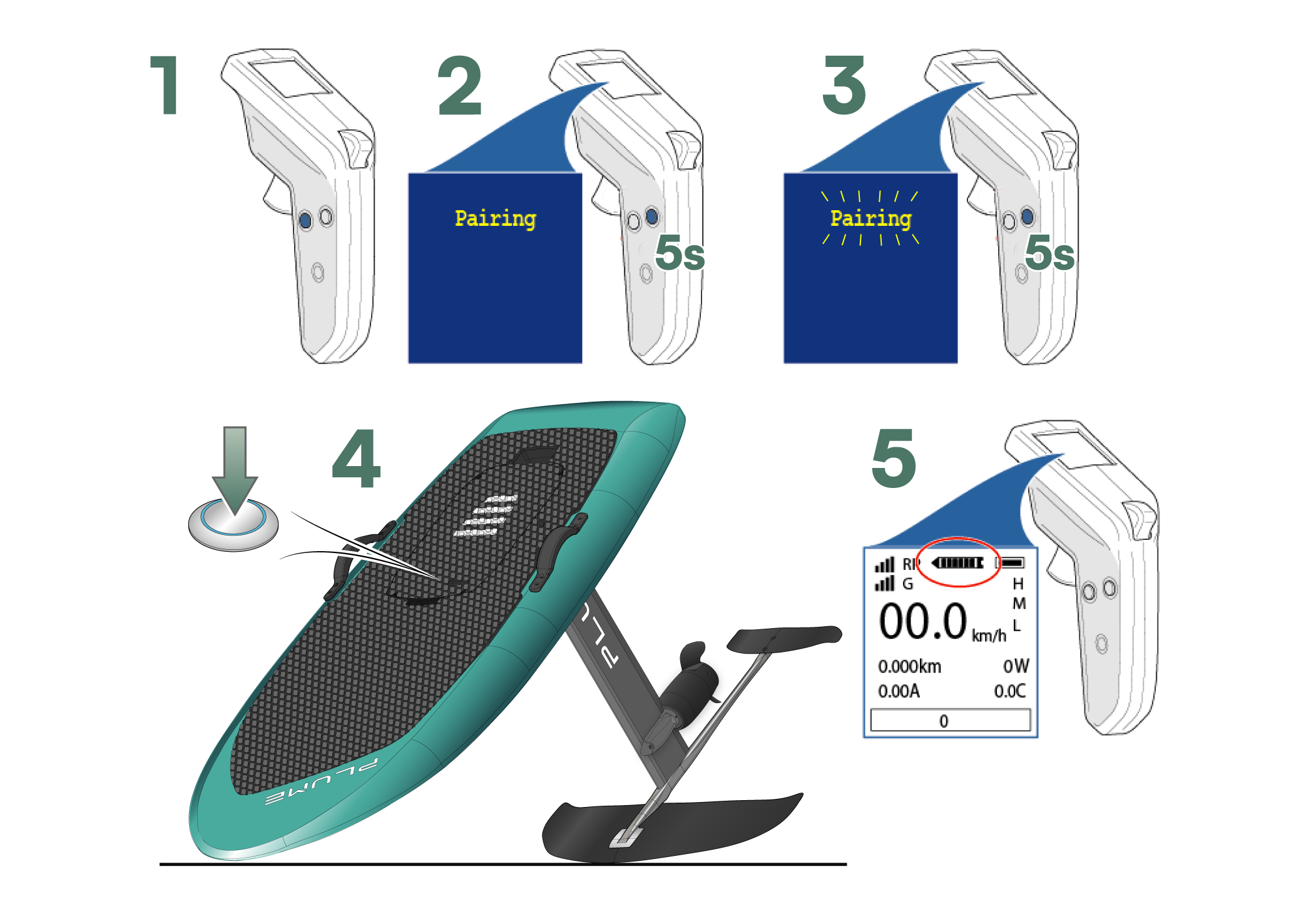
The pairing procedure allows you to configure the communication between the remote control and the Plume.
If, when powering on your efoil, the motor controller emits beeps and the motor does not run, it is likely that the communication with the remote control is lost. Please check the proper connection of the antenna with the mast (under the battery). If the antenna connection is good and the problem persists, please proceed with pairing the remote control.
Initial State
The Plume is assembled, and the power is turned off (battery button off).
Turn on the Remote Control
Enter the Configuration Menu
By pressing and holding the setup button (next to the ON/OFF button). The pairing configuration is the first page of the configuration menu.
Activate Pairing
By pressing and holding the setup button again. The text Pairing starts flashing on the remote control screen.
Power on
Using the ON/OFF button on the battery. The motor controller confirms successful pairing by emitting a BEEP BEEP sound.
Inductive Charging
Plug the charging dock into a power outlet
Using the provided USB charger and cable.
Place the turned-off remote control on the charging dock
The double ring on the side of the remote control should be positioned in the middle of the dock.
Charging Begins
- The remote control screen displays the charge level.
- The blue ring on the dock illuminates in "pulsating" mode.
Remote Control Settings
Incorrect settings for certain parameters (Usage, ESC Type, and PPM Mode) may cause the machine to malfunction.
Enter the menu
- Long press on SETUP button
Navigate the menu
- Short press on MENU → Next parameter
- Long press on MENU → Edit current parameter
Parameter modification
- Press triggers → Change parameter
- Short press on ON/OFF → Save & Quit
Default Parameters
- Pairing → N/A
- Usage Scenario → Esurf ⚠️
- Transmit Power → [-30dB .. +13dB]
- ESC Type → NON VESC ⚠️
- Thrott Calibrate → Courses Gâchettes
- Battery Cells → 12
- Speed Option → km/h
- PPM Mode → No Brake ⚠️
- Ping Switch → ON/OFF
- Lock Switch → ON/OFF
- Set Lock Time → 800ms
- Low Battery Warn → ON/OFF
- Thrott Sensitive → Level [0 .. 3]
- Fault Check → N/A ("FAULT CODE NONE")
- Version → N/A