Battery Charging
Battery Charging Procedure
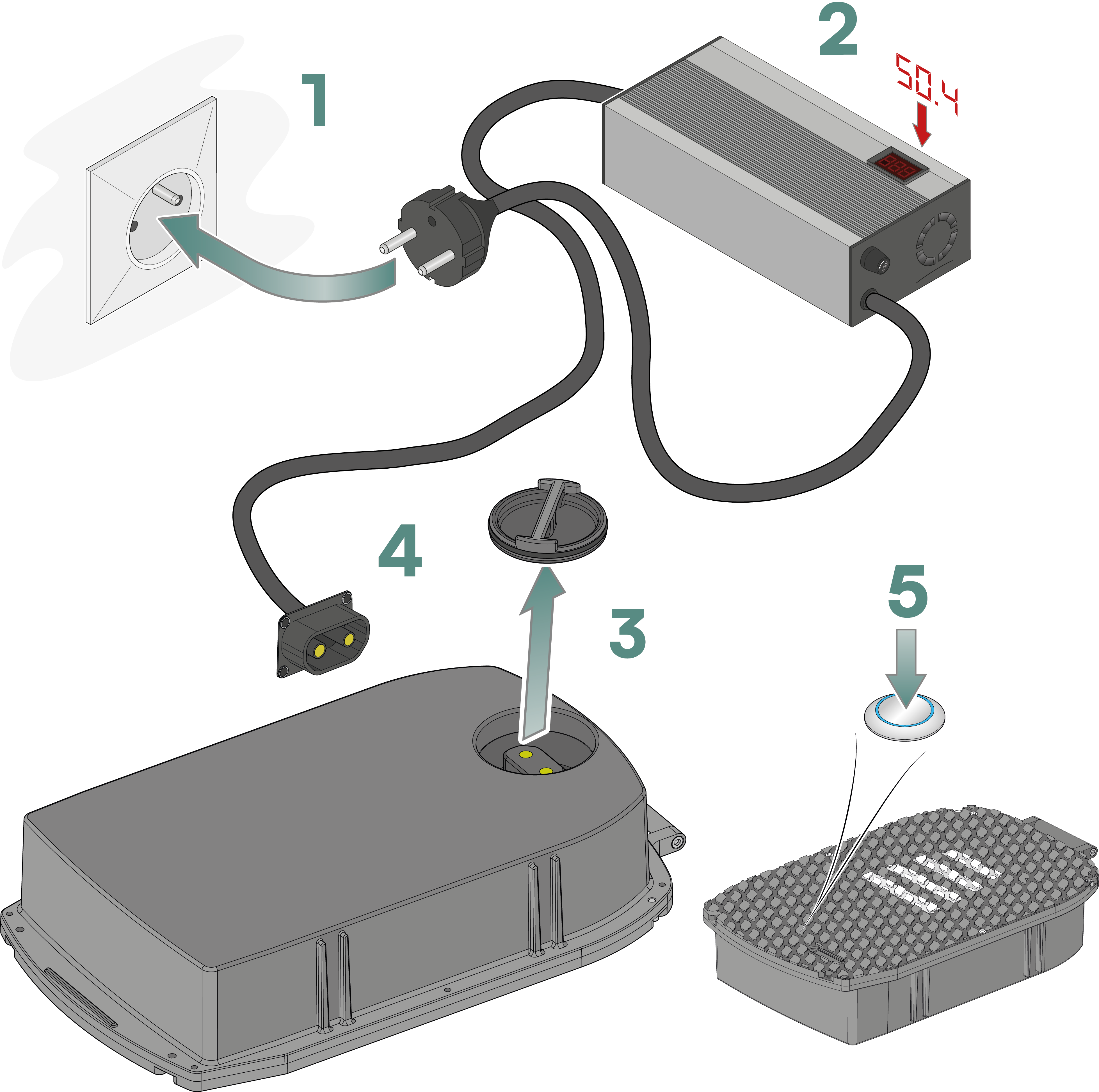
Plug the charger into the power outlet.
Wait for 30 seconds to allow the charger's internal voltage to stabilize.
Remove the protective cap from the battery connector.
Connect the battery.
The display will show 100%, which corresponds to the charger's voltage and not the battery's charge level.
Start the charging process by pressing the battery's ON/OFF button.
Once the charging is complete, the charger will automatically shut off.
Turn off the battery's power button.
The display will turn off and then turn back on, showing 100%, which corresponds to the charger's voltage.
Disconnect the plug connector from the battery.
Unplug the charger from the power outlet.
- Never leave the battery unattended during the charging process.
- Disconnect the battery after it has finished charging.
Never leave the battery fully discharged for an extended period, as this can significantly degrade its lifespan or render it unusable.
- If the charger does not automatically shut off at the end of the charging process,
- If the battery temperature abnormally increases during the charging process,
➡️ Disconnect the charger, place the battery in a safe location, and contact Whimsitech's technical service.
During winter storage or periods when the Plume is not in use, periodically check the battery's charge level (ideally every month). To maximize the battery's lifespan, ensure that the battery's charge level remains between 30% and 70% during periods of inactivity.